

Business Entity Registration
License holders have the option to register LLCs and S-Corporations (S-Corps) with TREC for the sole purpose of receiving compensation, as long as those entities meet certain requirements.
Business Entity Registration Versus Business Entity License
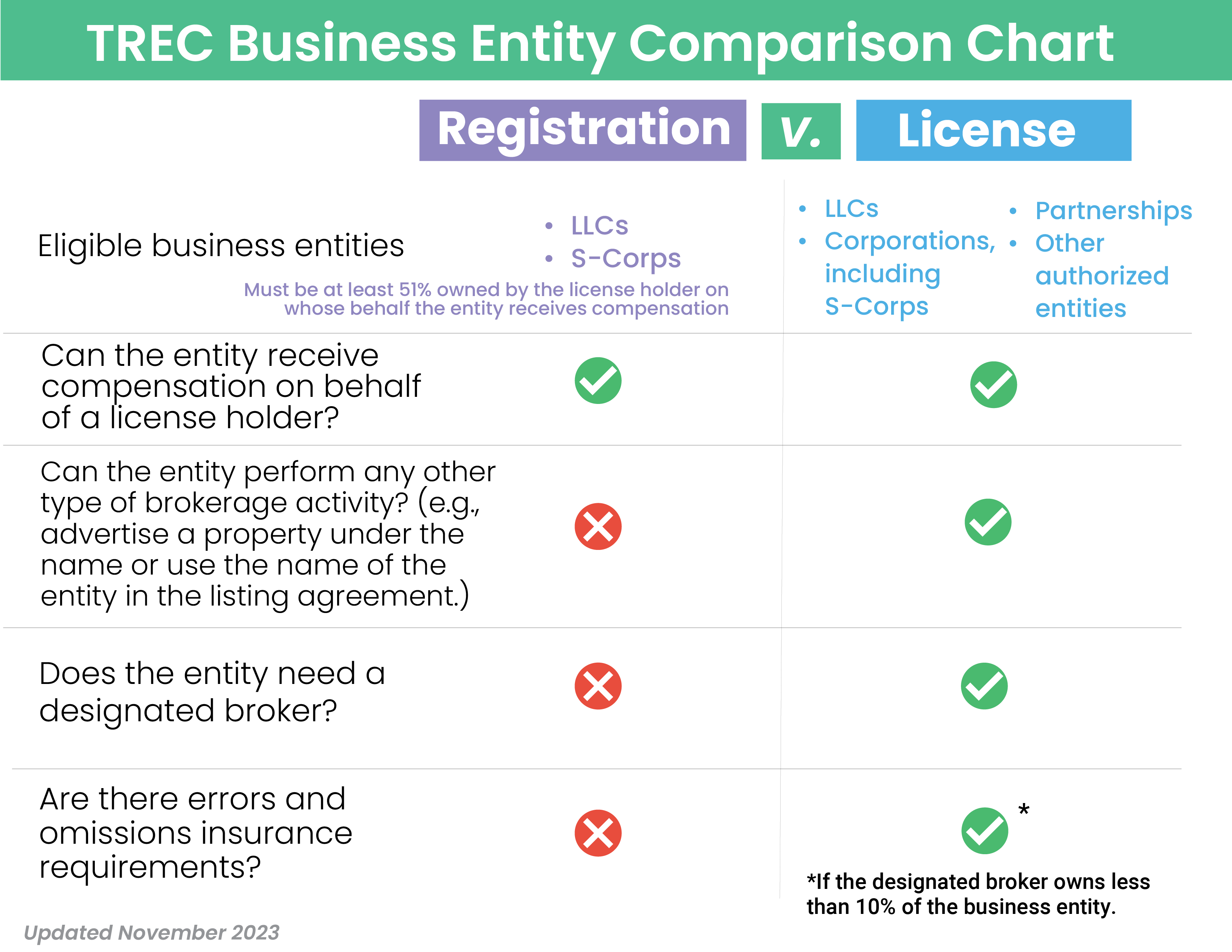
LLCs and S-Corps used for registration must be at least 51% owned by the license holder on whose behalf the entity receives compensation. Importantly, you cannot use the LLC or S-Corp that you register with TREC to receive compensation to perform any other type of brokerage activity. Doing so would be unlicensed activity and would result in disciplinary action.
The TREC Business Entity Comparison chart below outlines some of the differences between business entity registration and the business entity broker license.
To apply for a business entity registration in the REALM Portal, follow these steps:
- Log in to your REALM Portal account.
- Click Create a New Application.
- Under TREC – Licenses, select Real Estate – Business Entity Registration Application.
To ensure a smooth application process, please make sure you have all required documents ready to upload before starting your application. View the full list of required documentation.
After submitting your application, you can check the status at any time by logging into the REALM Portal and selecting your pending application. The license number suffix for the business entity registration is -BENT, e.g., 1234-BENT.
Follow the same renewal steps as other licenses to renew your business entity registration.
Did Business Entity Broker Licenses Go Away?
No. You still have the option to keep or pursue a business entity broker license, which you should do if you intend to do anything more than accept compensation. There are benefits to holding a business entity broker license versus registration, such as the ability to use the name of the entity to advertise or as a party in a listing or buyer representation agreement.



 Customer Survey
 Rules and Laws
 Contract Forms